
Every business in the UK needs someone to keep its computers, networks, and data running. The question is who that someone should be: An employee? An outside service? Or a mix of both?
There’s no single right answer to this question. The right choice usually depends on your budget, size, the systems you run, and how much risk you’re willing to live with. In this guide, we’ll compare managed AI support and in-house AI side by side, helping you weigh up costs, skills, and make the right decision.
What Is Managed IT Support?
Managed IT support means paying someone outside your company (a managed service provider or MSP) to look after some or all of your IT for a fee. They usually handle help desk support, security updates, monitoring, backups, and user accounts under an agreed contract.
It’s a common route for smaller firms. Many small to medium-sized enterprises use managed service providers to deliver IT products and services. The government’s Cyber Security Breaches Survey 2025/2026 also found that use of external cyber security consultants rises with business size, from 24% of micro businesses to 39% of small and 51% of medium businesses.
What Is In-House IT Support?
In-house means employing your own IT staff; it could be one technician or a full team, and they’re on your payroll. “In-house IT” usually means one person for many businesses in the UK. And it’s also possible that that person handles IT on top of another job.
How Do the Costs Compare?
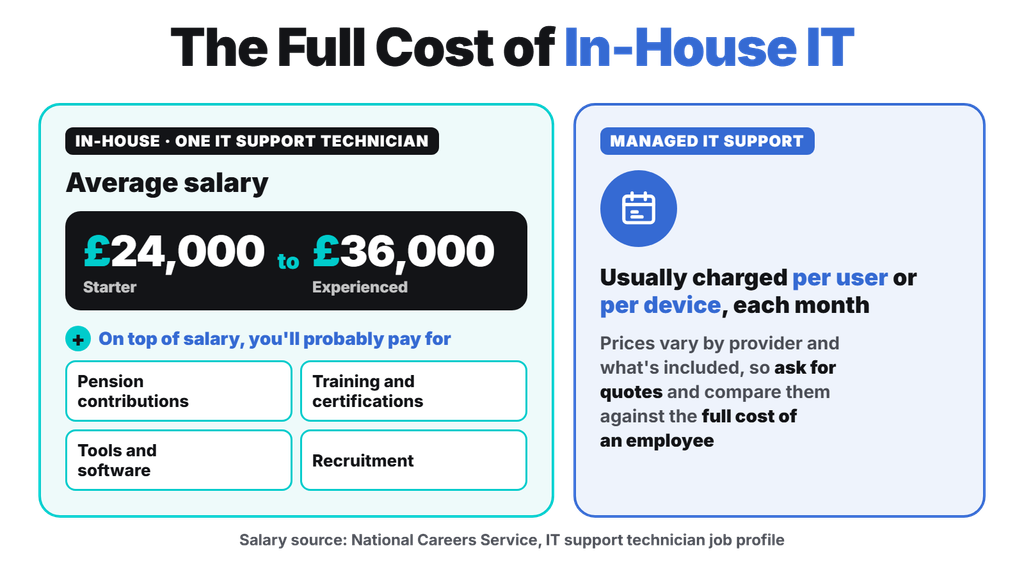
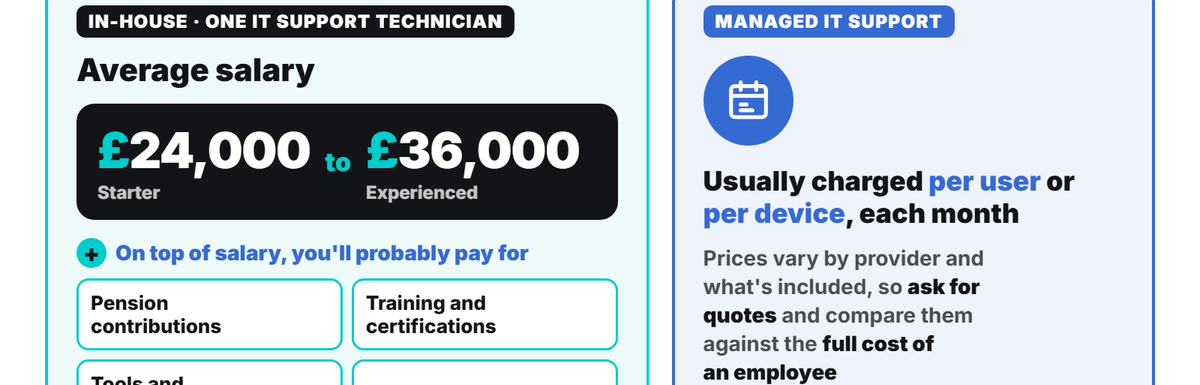
In-house IT usually costs more than outsourced IT support. Take a single in-house IT support technician as an example. The National Careers Service puts average pay at £24,000 for a starter and £36,000 for an experienced technician. On top of salary, you’ll probably pay for:
- Pension contributions
- Training and certifications to keep skills up to date
- Tools and software, such as monitoring, backup, and security platforms
- Recruitment, at the start, and when a person leaves
Managed IT support providers usually charge per user or per device each month. Prices vary by provider and by what’s included, so ask for quotes and compare them against the full cost of an employee.
Which Option Gives You Better Skills and Expertise?
Managed IT support usually gives you access to a wider range of skills, while an in-house person gives you deeper knowledge of your own business. Modern IT covers a lot of ground: Cloud services, Microsoft 365, networking, backups, compliance, and cybersecurity. One person can rarely cover all of it well.
A managed IT support provider spreads that work across a team with different skills. An in-house technician, on the other hand, tends to know your people, your software quirks, and your priorities better. However, a good managed IT support provider doesn’t take a lot of time to learn your business and systems.
What About Cover, Holidays and Response Times?
A managed provider can usually cover absences and busy periods, while a single in-house employee is more likely to leave gaps whenever they’re away.
Many workers on a five-day week are entitled to at least 28 days’ paid annual leave a year. Add sick days and training, and a one-person IT function may be unavailable for several weeks a year. If something breaks while they’re off, you may have no one to rely on.
Managed IT contracts usually set out support hours and response times in a service level agreement. Read these carefully, since work outside office hours can cost extra. In-house staff do have the edge on hands-on, on-site problems. Someone in the building can fix a printer or swap a laptop straight away, while a provider may need to book a visit or work remotely.
Is Managed IT Support More Secure Than In-House IT?
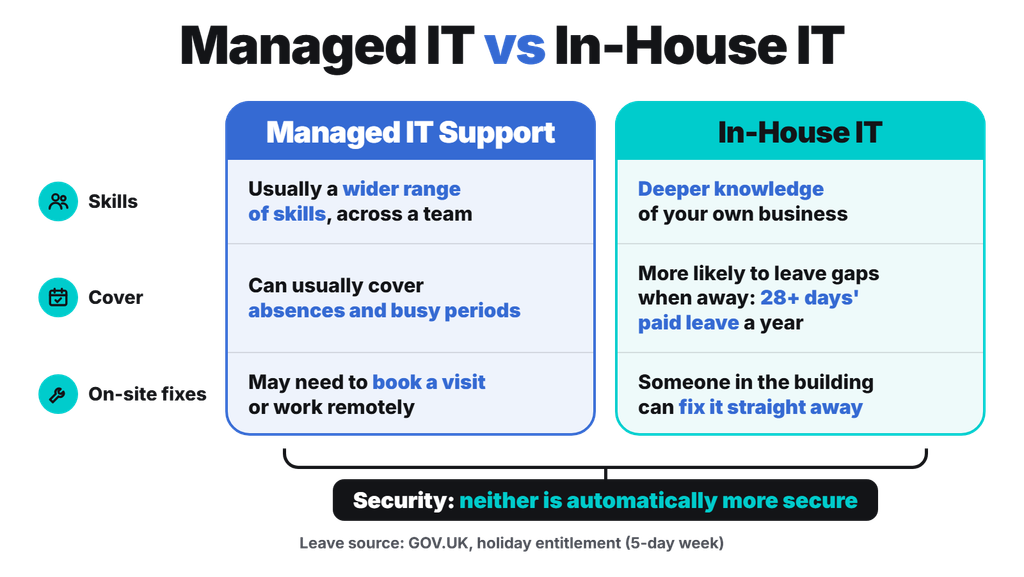
Neither option is automatically more secure. Security depends on the skills, processes, and checks in place, no matter who provides them.
Managed providers often bring security tools and experience that a small business would need. However, the NCSC’s guidance on choosing a managed service provider advises using MSPs with recognised certifications such as Cyber Essentials Plus, and recommends using clear contracts that set out responsibilities, response times, and liability.
Outsourcing doesn’t mean handing over every responsibility either. Your contract spells out what remains with you as the customer. For a clear picture of the security baseline to aim for, our guide to Cyber Essentials explains the five core controls.
What Is Co-Managed IT?
Co-managed IT combines both models. You keep an in-house IT person or team, as well as a managed provider who supports your in-house team with extra skills or tools.
This can suit growing businesses that already employ IT staff but need help with specialist areas, such as cyber security. Your team keeps the local knowledge, and the provider fills the gaps.
Which Option Is Right for Your Business?
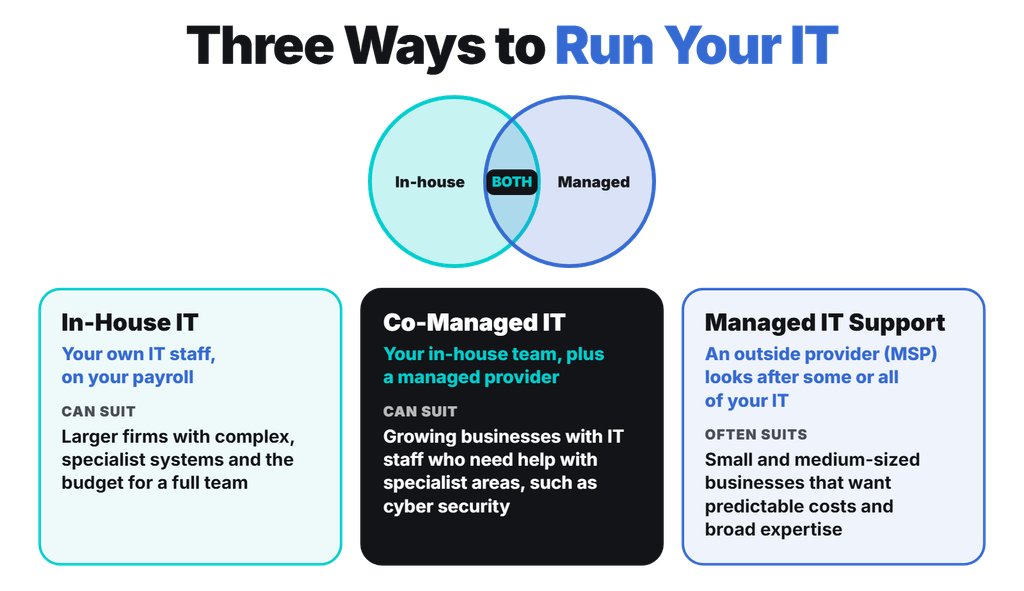
Managed IT support often suits small and medium-sized businesses that want predictable costs and broad expertise. In-house IT can suit larger firms with complex, specialist systems and the budget for a full team.
To decide, ask yourself:
- How many staff and devices do you need to support?
- Do you need someone on site every day?
- Can you fund salary, training, tools and holiday cover for an in-house role?
- Do you handle sensitive data or need certifications such as Cyber Essentials?
- Do you already have IT staff who could use extra support?
How Can Netzen Help You Decide?
Netzen has been providing managed IT support to UK businesses since 2005, covering Bath, Bristol, Reading, London, the Thames Valley, and beyond. We hold Cyber Essentials Plus, and we can help you compare the true cost of in-house IT with a managed or co-managed approach. Let’s discuss what fits your business.